9 Best Telescopes With App Control or Guidance (October 2026)
The best telescopes with app control and guidance include the Gskyer Telescope for simple phone snapshots, the MEEZAA Telescope for a larger beginner refractor, and the Celestron Travel Scope 80mm Telescope Kit for travel and sky-planning software.
On this page (7 sections)
- How we chose telescopes with app guidance or control
- Which telescope with app features fits each kind of observer?
- The best telescopes with app control or guidance
- How do you choose between guidance, control, and phone photography?
- Will your phone work with a guided telescope?
- Are app telescopes good for beginners?
- Which telescope with app control should you choose?
The Celestron StarSense Explorer LT 114AZ Newtonian Smartphone is the best telescope with app guidance for visual observing because its app helps you aim a manual telescope at selected objects. For automated phone-based imaging, the ZWO Seestar S30 Pro Smart Telescope or DWARFLAB Dwarf 3 Smart Telescope is a better match.
“App telescope” can mean several different things. Some scopes use a phone adapter only to take photos, some use an app to guide your aiming, and smart telescopes use apps to control image capture and tracking.
If you want to use your phone as a camera, compare these telescopes with phone attachments. For a broader look at scopes that work with a phone, see our best telescope that connects to a phone.
Our picks at a glance
-
1
-
2

-
3
 Best for travel and sky-planning software
Celestron Travel Scope 80mm Telescope Kit
9.6/10 our score
See it on Amazon
- 4
 Check it
Celestron StarSense Explorer LT 114AZ Newtonian Smartphone
Best for guided visual observing - 5
 Check it
ZWO Seestar S30 Pro Smart Telescope
Best for automated imaging - 6
 Check it
Celestron NexStar 8SE Computerized Telescope
Best for a large automated visual scope - 7
 Check it
Gskyer 130EQ Professional Astronomical Reflector Telescope
Best for Bluetooth photo triggering - 8
 Check it
DWARFLAB Dwarf 3 Smart Telescope
Best for portable dual-camera imaging - 9
 Check it
MEEZAA Telescope for Adults & Kids
Best for family phone photos
How we chose telescopes with app guidance or control
The best app telescope for you depends on whether you want guidance, automated movement, or phone photos through an eyepiece. We compared the control method, included phone features, observing style, and the optical or imaging details available for each pick.
We gave the most relevance to systems where an app helps locate or capture targets. A phone adapter or Bluetooth shutter remote can make photography easier, but neither feature guides the telescope to an object.
Scores weigh the features and specifications against the needs of someone shopping for app guidance or control. A higher score here means a closer fit to that search, not a claim that every model will suit every observer.
| Product | Best for | Aperture | Focal length | Phone feature | Our score |
|---|---|---|---|---|---|
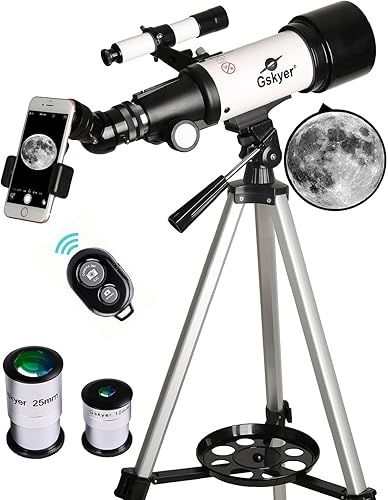
| Gskyer Telescope | simple phone snapshots | 70 mm | 400 mm | Adapter and wireless camera remote | 9.7 |
| MEEZAA Telescope | a larger beginner refractor | 90 mm | 800 mm | Adapter for photos and videos | 9.6 |
| Celestron Travel Scope 80mm Telescope Kit | travel and sky-planning software | 80 mm | Adapter for phone photos and video | 9.6 | |
| Celestron StarSense Explorer LT 114AZ Newtonian Smartphone | guided visual observing | 114 mm | StarSense sky recognition and guided aiming | 9.5 | |
| ZWO Seestar S30 Pro Smart Telescope | automated imaging | App control and live smartphone viewing | 9.3 | ||
| Celestron NexStar 8SE Computerized Telescope | a large automated visual scope | 8 in | Compatible with optional wireless-control accessories | 9.3 | |
| Gskyer 130EQ Professional Astronomical Reflector Telescope | Bluetooth photo triggering | 130 mm | Bluetooth camera remote | 9.2 | |
| DWARFLAB Dwarf 3 Smart Telescope | portable dual-camera imaging | Dedicated app with one-touch processing | 9.1 | ||
| MEEZAA Telescope for Adults & Kids | family phone photos | 80 mm | 500 mm | Adapter for photos and videos | 8.8 |
Which telescope with app features fits each kind of observer?
A StarSense telescope fits visual observers who want help aiming, while a smart telescope fits people who want app-led imaging. Conventional scopes with phone adapters are useful for capturing eyepiece views but still need manual aiming.
What is the best telescope with app guidance for visual observing?
The Celestron StarSense Explorer LT 114AZ Newtonian Smartphone is the clearest fit if you want to look through an eyepiece and get help finding targets. You dock a compatible phone, choose an object, then follow the app's arrows while moving the manual mount.
It has a 114 mm Newtonian reflector and an altazimuth mount with slow-motion adjustment. The mount remains manual, so this is guided aiming rather than automatic GoTo tracking.
For a closer look at the StarSense line, read our Celestron StarSense reviews. If you are weighing a guided scope against an entry-level manual model, our StarSense Explorer vs AstroMaster comparison explains the key difference.
What should you choose for app-controlled imaging?
A smart telescope is the better match when you want the app to handle targeting, tracking, and image capture. The Seestar S30 Pro and Dwarf 3 are built around app-based imaging rather than traditional eyepiece viewing.
The Seestar S30 Pro offers automatic GoTo targeting and tracking, with one-tap imaging modes and image processing. Its stated focus is deep-sky and wide-field imaging, and it isn't intended for planetary observation.
The Dwarf 3 combines telephoto and wide-angle cameras with automatic tracking and app processing. It is also designed for daytime subjects, including wildlife and landscapes.
Our Seestar S30 Pro vs S30 comparison can help if you have narrowed your choice to the Seestar family. For other automated scopes with imaging features, see computer-controlled telescopes with cameras.
Do phone adapters provide app control?
No. A phone adapter holds your phone to the eyepiece for photos or video, but it doesn't move the telescope or identify objects for you.
The Gskyer Telescope, MEEZAA Telescope, Celestron Travel Scope 80mm Telescope Kit, and MEEZAA Telescope for Adults & Kids include phone adapters or photo tools. They are conventional scopes that you aim and focus by hand.
The best telescopes with app control or guidance
The best telescope with app features depends on what you want your phone to do. These picks range from simple camera triggering to guided visual aiming and automated imaging.
Gskyer Telescope: Best for simple phone snapshots
- 70 mm aperture
- 400 mm focal length
- Smartphone adapter
- Wireless camera remote
A phone adapter and wireless camera remote let you capture views through this portable refractor. It doesn't provide app-based object guidance or telescope control.
Pros
- Phone adapter and remote included
- Carry bag included
- Two eyepieces and a 3x Barlow lens
Cons
- No app-based object finding
- Manual altazimuth mount
The Gskyer Telescope is a straightforward choice if your goal is to record what you see through an eyepiece. It pairs a 70 mm aperture and 400 mm focal length with a phone adapter and wireless camera remote.
Two replaceable eyepieces and a 3x Barlow lens provide different magnifications, while the 5x24 finder scope helps you locate a target by sight. The remote can trigger the phone camera without touching the screen during a shot.
This is not a phone-guided telescope. You still aim the altazimuth mount yourself, so choose it for basic visual use and phone snapshots rather than app navigation or automatic tracking.
MEEZAA Telescope: Best for a larger beginner refractor
- 90 mm aperture
- 800 mm focal length
- Smartphone adapter
- Carry bag
Its 90 mm aperture and included phone adapter suit beginners who want to record views through a conventional telescope. Object finding and mount movement remain manual.
Pros
- 90 mm aperture
- Phone adapter and carry bag included
- Two eyepieces and a 3x Barlow lens
Cons
- No app guidance or automated tracking
- Manual altazimuth mount
The MEEZAA Telescope suits a beginner who wants a larger refractor and a way to photograph eyepiece views. Its 90 mm aperture and 800 mm focal length are paired with a phone adapter and a carry bag.
Two eyepieces and a 3x Barlow lens are included. The manual altazimuth mount means you locate and follow objects yourself, even when you use your phone to capture a view.
Choose this when aperture and a phone camera adapter matter more than app-based guidance. If you want the phone to help you find objects, the StarSense Explorer is the more relevant pick.
Celestron Travel Scope 80mm Telescope Kit: Best for travel and sky-planning software
- 80 mm aperture
- Smartphone adapter
- Starry Night software download
- Backpack included
A smartphone adapter supports recording at the eyepiece, and a Starry Night software download helps identify objects and plan sessions. The scope itself is not app-guided.
Pros
- Backpack and phone adapter included
- Software supports object identification and planning
- No-tool setup
Cons
- Phone app does not guide the telescope to targets
- Manual aiming
The Celestron Travel Scope 80mm Telescope Kit is a portable refractor with a smartphone adapter and Starry Night software download for identifying celestial objects and planning sessions. The software supports preparation, while the adapter lets you record views through the eyepiece.
The 80 mm aperture and two eyepieces support different views, and the included backpack keeps the scope and accessories together for travel. Its no-tool setup is also useful if you want to move between a backyard and a campsite.
The software does not guide the telescope as you aim. Choose this model for portability, planning help, and phone photography, not automated pointing.
Celestron StarSense Explorer LT 114AZ Newtonian Smartphone: Best for guided visual observing
- 114 mm Newtonian reflector
- StarSense smartphone app guidance
- On-screen arrows to targets
- Manual altazimuth mount
StarSense uses a docked smartphone to recognize the sky and guide manual aiming with on-screen arrows. The mount does not automatically slew or track targets.
Pros
- App suggests objects based on time and location
- Guided aiming through the eyepiece
- 114 mm reflector
Cons
- You move the telescope by hand
- Phone compatibility depends on operating system
The Celestron StarSense Explorer LT 114AZ Newtonian Smartphone is the best match here for app-guided visual observing. Its phone dock and StarSense app use sky recognition to estimate the telescope's position and direct you toward a selected object with on-screen arrows.
The app can suggest targets based on your time and location. Once you follow the arrows and the bullseye turns green, you can look through the eyepiece to view the target.
The telescope uses a 114 mm Newtonian reflector and a manual altazimuth mount. You move the scope yourself, which keeps the system distinct from a motorized GoTo telescope.
Check that your phone meets the compatibility requirements before choosing it. StarSense Explorer supports Android 12 and later and iOS 18 and newer, including iPhone XR and newer models.
For an alternate StarSense setup, our Celestron StarSense Explorer DX 5 review covers a different telescope in the same guided family.
ZWO Seestar S30 Pro Smart Telescope: Best for automated imaging
- App control
- Automatic GoTo targeting and tracking
- One-tap image capture and processing
- Designed for deep-sky imaging
The app controls a compact imaging system that automatically targets and tracks objects, then captures images. It is designed for deep-sky objects and isn't intended for planetary observation.
Pros
- Automatic targeting and tracking
- One-tap imaging modes
- Built-in image processing
Cons
- Imaging-first system rather than a conventional eyepiece scope
- Not intended for planetary observation
The ZWO Seestar S30 Pro Smart Telescope is the strongest fit for app-led astrophotography in this group. Its app handles automatic GoTo targeting and tracking, and you can view the sky live on a smartphone while capturing images.
One-tap modes cover deep-sky and wide-field imaging, with automatic image processing and mosaic stitching. It is designed for deep-sky objects and isn't intended for planetary observation, so it is not the pick for someone who wants to inspect planets through an eyepiece.
At about 3.6 lb, it is a compact imaging system for travel and outdoor sessions. Keep it stationary during deep-sky imaging for stable tracking.
Celestron NexStar 8SE Computerized Telescope: Best for a large automated visual scope
- 8 in Schmidt-Cassegrain optics
- Computerized GoTo mount
- 40,000+ object hand-control database
- SkyAlign
The included hand control selects targets from a database of more than 40,000 objects, and the mount slews and tracks them. Wireless phone control requires a compatible accessory.
Pros
- Automated GoTo mount
- SkyAlign uses 3 bright stars or planets
- 8 in optics
Cons
- Phone control is not the included control method
- More setup and equipment than a manual beginner scope
The Celestron NexStar 8SE Computerized Telescope provides computerized aiming and tracking, but its included controller is a hand control rather than a phone app. Select from its database of more than 40,000 objects, and the mount slews to and tracks the target.
SkyAlign uses three bright stars or planets to align the system, even if you don't know their names. Its 8 in Schmidt-Cassegrain optics make this a larger visual telescope than the portable app-imaging systems above.
For a smaller aperture option, compare 6-inch telescope options.
Celestron offers wireless control through compatible accessories, so factor the extra accessory into your decision if phone operation is essential. This is a better fit for someone prioritizing a computerized visual telescope with room to add wireless features.
Gskyer 130EQ Professional Astronomical Reflector Telescope: Best for Bluetooth photo triggering
- 130 mm reflector
- Bluetooth camera remote
- German equatorial mount
- Three eyepieces
A Bluetooth camera remote can trigger a compatible phone camera, but the remote doesn't guide the telescope or control its mount. Choose it for photo triggering rather than app navigation.
Pros
- 130 mm aperture
- Bluetooth camera remote
- Three eyepieces and a 3x Barlow lens
Cons
- No app-based guidance or GoTo control
- Equatorial mount has a different setup process from an altazimuth mount
The Gskyer 130EQ Professional Astronomical Reflector Telescope has a Bluetooth camera remote for triggering a compatible phone camera, not an app that finds targets or controls the telescope. Its 130 mm reflector and German equatorial mount make it a conventional manual scope with a phone-photo accessory.
The accessory set includes three eyepieces and a 3x Barlow lens. The Bluetooth remote can reduce screen contact while taking a picture, but you still locate the object and adjust the telescope yourself.
Choose it if the camera trigger is useful and you are comfortable with a manual equatorial mount. Skip it if your main need is guided aiming or app-controlled tracking.
DWARFLAB Dwarf 3 Smart Telescope: Best for portable dual-camera imaging
- App-based image processing
- Automatic tracking and GoTo
- Telephoto and wide-angle cameras
- About 3 lb
The app supports one-touch image processing, while automatic GoTo and tracking handle the imaging session. Its dual-camera design also covers daytime subjects and wide night scenes.
Pros
- Portable design
- Automatic tracking and GoTo
- Telephoto and wide-angle imaging
Cons
- Imaging system rather than a conventional eyepiece telescope
- App and automated features are central to how it works
The DWARFLAB Dwarf 3 Smart Telescope suits a traveler who wants a compact camera system with app processing and automatic tracking. It weighs about 3 lb and combines a telephoto lens for distant subjects with a wide-angle camera for night scenes.
Its dedicated app supports one-touch processing, and the system includes automatic GoTo and tracking features. The dual-camera setup also covers daytime wildlife and landscape imaging, so it can do more than capture deep-sky targets.
This is not a traditional telescope for viewing through an eyepiece. Choose it when you want automated image capture and processing on a phone, with a portable design for trips.
MEEZAA Telescope for Adults & Kids: Best for family phone photos
- 80 mm aperture
- 500 mm focal length
- Phone adapter
- Waterproof backpack
The phone adapter supports photos and videos through the eyepiece, making this a family-friendly conventional scope. It doesn't include app-based guidance or motorized control.
Pros
- Phone adapter and backpack included
- 80 mm aperture
- Adjustable tripod
Cons
- No app guidance or automated tracking
- Manual aiming and focusing
The MEEZAA Telescope for Adults & Kids is a family-oriented conventional refractor with a phone adapter and backpack. Its 80 mm aperture and 500 mm focal length give you a manual scope for viewing and recording through an eyepiece.
The kit includes two eyepieces, a 3x Barlow lens, a finder scope, and an adjustable tripod. The phone adapter supports photos and videos, but the scope has no app guidance or automated tracking.
Choose this if you want a portable family kit and simple phone photography. If you want your smartphone to help locate objects, the StarSense Explorer is the better fit.
How do you choose between guidance, control, and phone photography?
First decide whether you want to observe through an eyepiece or capture images on a screen. That choice narrows the field faster than comparing phone accessories alone.
- For guided visual aiming: choose a telescope such as the StarSense Explorer LT 114AZ, where the app points you toward objects and you move the mount manually.
- For automated imaging: choose a smart telescope such as the Seestar S30 Pro or Dwarf 3, where the app starts and manages imaging functions.
- For phone photos through a conventional scope: choose a telescope with a phone adapter, and expect to aim and focus by hand.
- For computerized visual tracking: consider a GoTo system such as the NexStar 8SE, while checking whether phone control needs an extra accessory.
A camera remote is another distinct feature. It can trigger your phone camera without touching the screen, but it doesn't make the scope app-controlled.
Will your phone work with a guided telescope?
Phone compatibility depends on the app and operating system, so check the requirements before buying. StarSense Explorer LT 114AZ supports Android 12 and later and iOS 18 and newer, including iPhone XR and newer models.
A phone adapter is different: it physically holds a phone by the eyepiece. Adapter fit can vary with phone size and case, so confirm that your device can be positioned securely and centered over the eyepiece.
Are app telescopes good for beginners?
They can help beginners, but the right kind depends on what you want to learn. StarSense Explorer adds guidance while you still aim a conventional telescope, while smart telescopes automate much of the imaging process.
A phone adapter is the simplest phone feature, but it does not make finding objects easier. If learning to identify and locate targets is part of the goal, look for a guidance app rather than a camera holder.
Which telescope with app control should you choose?
Choose the StarSense Explorer LT 114AZ if you want app guidance while observing through an eyepiece. Pick the Seestar S30 Pro or Dwarf 3 for automated, app-led imaging, and choose a phone-adapter scope if you only need help recording what you see.
The best telescope with app features is the one whose phone function matches your observing style. Check whether you want guidance, automated control, or a camera mount before comparing aperture and accessories.
Our top 3 picks at a glance
-
1
-
2
-
3
Best for travel and sky-planning software
Celestron Travel Scope 80mm Telescope Kit
9.6/10 our score
See it on Amazon
Frequently asked questions
What is the difference between app guidance and app control?
App guidance shows you where to aim while you move the telescope yourself. Celestron StarSense Explorer LT 114AZ uses a docked phone and on-screen arrows for this purpose.
App control can operate an automated system, such as the Seestar S30 Pro, which targets and tracks objects through its app.
Can a phone adapter help find stars?
A phone adapter holds a smartphone near the eyepiece so you can record the view. It doesn't identify targets or direct the telescope by itself.
For guided aiming, choose a telescope with an object-finding app, or pair a conventional scope with a separate astronomy app and aim manually.
Does a computerized telescope always use a phone app?
No. The NexStar 8SE includes a hand control for choosing objects and operating its GoTo mount.
Its phone and wireless-control options require compatible accessories.
Check whether app control is included or depends on an add-on before choosing a computerized scope.
Can app-controlled smart telescopes replace a regular telescope?
They can suit you if your main goal is capturing and viewing images on a phone. The Seestar S30 Pro and Dwarf 3 automate imaging tasks, while a conventional telescope lets you observe directly through an eyepiece.
Choose based on whether you want screen-based imaging or visual observing.


