How to Align a Celestron Telescope
Align a Celestron telescope by leveling the mount, entering the correct time and location, and centering the stars its hand control requests. The exact steps depend on the mount and whether you use a finder, StarSense, or another alignment aid.
On this page (9 sections)
- What does alignment do on a Celestron telescope?
- What should you check before aligning?
- How do you align a Celestron computerized telescope?
- How do you use StarSense to align a Celestron telescope?
- How do you align a Celestron telescope without a hand control?
- What accessories can help during alignment?
- Why does a Celestron telescope miss its target?
- What should you do after alignment?
- How do you align a Celestron telescope reliably?
Align a Celestron telescope by leveling the mount, entering the correct time and location, and centering the stars its hand control requests. The exact steps depend on the mount and whether you use a finder, StarSense, or another alignment aid.
A careful setup helps a computerized mount point toward selected objects. Start with your telescope’s manual, since Celestron models use different mounts and alignment options.
What does alignment do on a Celestron telescope?
Alignment teaches a computerized mount how the telescope is oriented under the sky. The mount uses the alignment stars, time, and location to calculate where other celestial objects should be.
Alignment is different from focusing. For that separate adjustment, see how to focus a Celestron telescope.
It’s also different from lining up a finder with the main telescope, although a well-aligned finder makes it easier to center the stars during setup.
Manual telescopes don’t need computerized sky alignment. If you’re learning how to do the telescope alignment, first identify whether your model has a hand control, an app, or a manual mount.
What should you check before aligning?
Set the telescope on stable ground and level the tripod before starting. Then confirm that you have the power supply, eyepiece, finder, and clear sky view your model requires.
Do these checks before selecting an alignment routine:
- Spread the tripod legs fully and secure them.
- Level the tripod or mount as the manual directs.
- Attach the optical tube and accessories securely.
- Check that the finder is aligned with the main telescope.
- Connect power and switch on the mount.
- Have your location, local time, date, time zone, and daylight saving setting ready.
Enter your location as accurately as the hand control allows. A wrong time zone or daylight saving setting can shift the mount’s sky map, even if the stars are centered carefully.
How do you align the finder first?
Aim the main telescope at a distant, stationary object in daylight, then adjust the finder until it points at the same object. Choose a safe target such as a faraway rooftop or pole, and use a low-power eyepiece to make it easier to locate.
Never use the Sun as a daytime alignment target. Keep the telescope pointed well away from it.
If the finder is new or has been bumped, see how to align a telescope finder scope. Check the alignment again at night on a bright star, since the finder may shift when you handle the telescope.
How do you align a Celestron computerized telescope?
Follow the hand control’s prompts and center each requested star in the eyepiece. Choose an alignment method supported by your mount, then confirm each star when it is centered.
A typical computerized setup works like this:
- Switch on the mount after the tripod and tube are secure.
- Enter your location, date, local time, time zone, and daylight saving setting.
- Select an alignment option from the hand control.
- Choose a bright star the mount offers and can see clearly.
- Use the finder to bring the star into view, then center it in a low-power eyepiece.
- Confirm the star and repeat the process for each required alignment point.
- Wait for the hand control to confirm alignment before selecting a target.
Use a low-power eyepiece while centering stars. A wider view makes it easier to find the target and place it accurately; switch to higher magnification later if the sky and target allow.
Move the mount in the direction shown on the hand control. On some mounts, the final centering direction matters because it reduces backlash, or slack in the gears.
Check your manual for the recommended direction.
Which stars should you choose?
Pick stars that are visible, well separated, and easy to identify. Follow the Celestron two-star alignment steps when using that method.
Avoid stars near the horizon, where trees, buildings, haze, and atmospheric distortion can make centering harder.
Use the names displayed by the hand control rather than guessing at stars. If clouds cover a requested star, choose another alignment option or restart with a clear patch of sky.
How do you use StarSense to align a Celestron telescope?
Attach and configure StarSense as your mount’s manual directs, then run the AutoAlign routine. StarSense scans the sky to help the mount determine its orientation, but it still needs a clear view and correct setup details.
Keep the telescope away from obstructions that block large parts of the sky. For the device-specific process, follow how to use Celestron StarSense or how to set up Celestron StarSense AutoAlign.
A StarSense routine can save you from manually centering several alignment stars. It won’t correct a loose tripod, an incorrect location, or a blocked camera view.
How do you align a Celestron telescope without a hand control?
A manual telescope doesn’t require computerized alignment; point it toward the target using its finder and mount. If you have a motorized mount without a computerized hand control, follow that mount’s instructions for polar or tracking alignment.
A manual alt-azimuth mount moves up, down, left, and right. Use the finder to locate the object, then center it in the eyepiece and make small adjustments as it moves across the sky.
For model-specific steps, see how to align a Celestron NexStar 8SE. If you’re learning on a beginner model, how to use a Celestron AstroMaster 70 covers its setup and observing basics.
What accessories can help during alignment?
A finder and low-power eyepiece help you locate and center alignment stars. Other accessories matter after alignment, when you’re observing or adjusting the view.
A 90-degree diagonal can make viewing more comfortable on compatible refractor and catadioptric telescopes, especially when aiming high overhead. The Celestron 1.25" Star Diagonal fits telescopes with 1.25 in focusers or visual backs and accepts standard 1.25 in eyepieces.
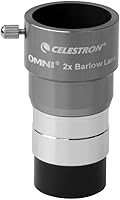
A Barlow lens increases eyepiece magnification, but it doesn’t help with alignment. The Celestron Omni 1.25" 2X Barlow Lens doubles the magnification of compatible 1.25 in eyepieces, so use it only after you’ve located and centered your target.
Binoculars can help you scan the sky and identify bright star patterns before using the telescope. The Celestron SkyMaster 15x70 binoculars have 15x magnification and 70 mm objective lenses; Celestron says their size and weight make tripod mounting suitable for extended viewing.
Why does a Celestron telescope miss its target?
Check the setup details, star centering, and finder alignment first. Small errors in time, location, or centering can add up and leave targets outside the eyepiece’s view.
Work through these checks:
- Re-enter the correct date, local time, time zone, and daylight saving setting.
- Confirm that the location is accurate and the mount is level.
- Make sure the alignment stars are the ones selected by the hand control.
- Center each star in the eyepiece, not just in the finder.
- Check that the finder points to the same target as the telescope.
- Tighten loose tripod, tube, or accessory connections.
- Repeat alignment if you moved the tripod or disturbed the mount.
If objects are close but not centered, improve star centering and review the mount’s final movement direction. If they are far off, start over and verify the location and time settings before changing other settings.
What should you do after alignment?
Select a bright, easy target and check whether the mount points close to it. If it misses, recenter the target only if your manual provides a calibration or alignment correction step.
Don’t add a Barlow lens while you’re still trying to find objects. Its higher magnification narrows the view, making it harder to locate targets and keep them centered.
Once the telescope points accurately, choose an eyepiece that gives a useful view for the target. If the image is dusty, learn how to clean telescope eyepieces before touching the glass.
How do you align a Celestron telescope reliably?
For accurate pointing, level the mount, enter the right time and location, and center each requested star carefully. Use StarSense if your model supports it and its camera has a clear view of the sky.
If you’re setting up for a child, how to pick a telescope for your kid can help you weigh ease of setup against features. For more accurate pointing, correct the time and location first, then repeat the alignment with well-spaced stars.
Frequently asked questions
What do you need to align a Celestron telescope?
You need a stable, level setup, a clear view of the sky, and accurate time and location details for the mount. Many computerized Celestron mounts also need a power source and a finder aligned with the main telescope.
Check your model's manual because the required steps and alignment choices vary.
Can you align a Celestron telescope during the day?
You can align a finder to the main telescope during the day using a distant stationary target, as long as the Sun is nowhere near the telescope's field of view. A computerized sky alignment needs visible stars or other targets the mount supports.
Never point a telescope at the Sun without a proper solar filter secured over the front aperture.
Why is my Celestron telescope pointing to the wrong place?
Wrong time, date, location, time zone, daylight saving setting, an unlevel mount, or imprecise star centering can all cause poor pointing. Confirm those details, then repeat alignment and center each star carefully in a low-power eyepiece.
Also check that the finder and telescope point to the same spot.
Does a Celestron telescope need alignment every night?
A computerized mount generally needs an alignment for each observing session, because it uses your setup and sky position to find targets. If you move the mount, change its orientation, or lose its reference, align it again.
A manual telescope can be used without computerized sky alignment.