How to Use Celestron StarSense AutoAlign
Celestron StarSense AutoAlign aligns a compatible computerized telescope by taking images of the sky and calculating its position. Mount the camera, connect the hand control, level and power the telescope, then follow the controller's prompts for alignment.
On this page (8 sections)
- How to use Celestron StarSense AutoAlign
- What is Celestron StarSense, and how does AutoAlign work?
- What should you check before starting alignment?
- Why might StarSense AutoAlign fail?
- How do you know alignment is complete?
- What accessories help after alignment?
- Is Celestron StarSense AutoAlign worth it?
- How should you use StarSense AutoAlign?
Celestron StarSense AutoAlign aligns a compatible computerized telescope by imaging the sky and calculating the mount's position. Attach the StarSense camera, connect the correct hand control, set up the mount, and follow its prompts to complete alignment.
The key distinction is that AutoAlign is alignment equipment for supported computerized telescopes. StarSense Explorer is a smartphone-guidance system that helps you find objects, and it does not automatically align a telescope mount.
How to use Celestron StarSense AutoAlign
Use StarSense AutoAlign by mounting the camera, connecting the control system, preparing the telescope, and running the alignment routine. The exact menu names and connection steps vary by telescope and accessory version, so use the manual for your specific equipment.
- Confirm that your telescope, mount, hand control, and StarSense accessory are compatible.
- Assemble the telescope and tripod on firm, level ground.
- Attach the StarSense camera in its designated bracket and connect the required cables.
- Power on the telescope and select the StarSense alignment option on the hand control.
- Follow the prompts while the camera captures sky images.
- Wait for the controller to report that alignment is complete, then test a GoTo movement.
Don't force a plug or mount the camera in a position that the equipment manual doesn't specify. If the hand control doesn't offer a StarSense alignment option, check the compatibility and connection before trying the routine again.
If you need a detailed equipment-specific walkthrough, see how to set up Celestron StarSense AutoAlign. For the general sequence behind how to do the telescope alignment, start with the mount and power setup.
What is Celestron StarSense, and how does AutoAlign work?
Celestron StarSense AutoAlign is a camera-based alignment system for compatible computerized telescopes. It images areas of the night sky and uses the controller to calculate where the telescope is pointing.
A regular alignment often asks you to center known stars through the eyepiece. AutoAlign is designed to reduce that manual star-selection work, but it doesn't remove the need to assemble the telescope, connect the right equipment, or follow the controller's instructions.
StarSense Explorer works differently. Its smartphone app guides you toward objects using a phone dock, while AutoAlign works with a compatible computerized mount to establish alignment.
Does StarSense Explorer automatically align a telescope?
No. StarSense Explorer guides your observing direction through a phone and dock; it isn't the AutoAlign camera and control system.
The Explorer app can help identify where to point, but it doesn't by itself align a computerized mount for GoTo operation.
Check the name and model on your telescope and accessory before following setup advice. Similar StarSense branding doesn't mean that the equipment uses the same hardware or procedure.
What should you check before starting alignment?
Before starting, confirm compatibility, a stable mount, power, and clear sky access. A setup problem can look like an alignment failure, so check the physical connections before repeating the routine.
- Check the manual or compatibility information for your exact telescope and accessory.
- Place the tripod on firm ground and level it as the manual directs.
- Make sure the camera has a clear view of the sky and isn't blocked by a roof, tree, or nearby structure.
- Connect the camera and hand control only to the ports specified in the instructions.
- Use the power source recommended for the mount, and secure its cable so it won't snag as the telescope moves.
- Give the telescope a view of open sky rather than aiming it into a wall or dense tree cover.
Don't assume that every Celestron mount uses the same ports or menu options. If you own a NexStar 8SE, follow the model-specific guide to how to align a Celestron NexStar 8SE.
Why might StarSense AutoAlign fail?
StarSense AutoAlign can fail when the camera can't see enough usable sky, a cable is loose, or the telescope setup doesn't match the selected routine. Check one issue at a time before restarting.
Start with the camera's view. Move away from obstructions and bright nearby lights, and make sure the camera faces the sky as intended.
Next, check the connections and power. Turn the mount off before reseating cables if the manual recommends that, then restart and select the correct alignment option.
If the system repeatedly stops at the same point, check that the accessory is supported by your mount and hand control. The telescope's instructions and Celestron support are the best sources for model-specific error messages or updates.
How do you know alignment is complete?
Alignment is complete when the hand control confirms success or allows normal GoTo operation. Then choose a visible target and see whether the mount points in its direction.
A successful alignment doesn't guarantee that every target will land perfectly in the eyepiece. If a GoTo target is off, check the mount's level, camera position, alignment conditions, and any calibration steps required by your manual.
A star diagonal can make viewing overhead targets more comfortable on compatible refractor or catadioptric telescopes. The Celestron 1.25-inch Star Diagonal fits telescopes with 1.25-inch focusers or visual backs and provides a 90-degree viewing angle.
It changes the viewing angle, not the alignment process. Check your telescope's instructions before adding or changing accessories during setup.
What accessories help after alignment?
After alignment, use accessories that suit the target and your telescope's fittings. They won't replace the StarSense camera or improve the mount's alignment routine.
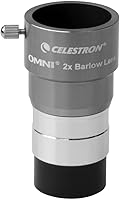
A 1.25-inch Barlow lens doubles an eyepiece's magnification when used with a compatible 1.25-inch focuser or diagonal. The Celestron Omni 2X Barlow accepts 1.25-inch eyepieces.
Higher magnification isn't always useful; the target, viewing conditions, and telescope all matter. Start with the eyepiece you normally use, then switch only if the view remains clear.
For wide-field sky viewing without a telescope alignment routine, Celestron SkyMaster 15x70 binoculars are another option. They have a built-in 1/4-20 tripod adapter for mounting on a compatible tripod.
These accessories serve different purposes: the Barlow changes eyepiece magnification, the diagonal changes viewing angle, and binoculars offer a separate way to observe. None is required to run StarSense AutoAlign.
Is Celestron StarSense AutoAlign worth it?
StarSense AutoAlign may be worth considering if you own a compatible computerized telescope and want camera-assisted alignment. It is less relevant if your telescope is manual, incompatible, or you prefer choosing alignment stars yourself.
The main benefit is less manual star selection during setup. The tradeoff is additional equipment, compatibility checks, and a setup routine that still depends on a stable mount, good connections, and an open view of the sky.
If you're deciding whether computerized pointing suits your observing style, read is a GoTo telescope worth it for beginners?. For model-specific instructions, compare how to align a Celestron telescope with the steps in your telescope's manual.
How should you use StarSense AutoAlign?
To use Celestron StarSense AutoAlign, verify compatibility, set up the telescope on firm ground, connect the camera and hand control, and follow the alignment prompts. Choose AutoAlign if you want a compatible computerized mount to calculate its position from sky images; choose StarSense Explorer when you want phone-guided help finding objects.
Once alignment succeeds, test a GoTo target before adding accessories. If the system doesn't complete the routine, check its view of the sky, cable connections, power, and model-specific instructions before repeating the steps.
Frequently asked questions
What does Celestron StarSense AutoAlign do?
StarSense AutoAlign uses a camera to image the sky and determine a telescope's position, then aligns a compatible computerized mount. This can reduce manual star selection, but you still need to set up the mount, connect the equipment, and follow the hand control's prompts.
Compatibility and exact steps depend on the telescope and controller.
Is Celestron StarSense Explorer the same as AutoAlign?
No. StarSense Explorer uses a smartphone dock and app to guide you toward objects in the sky.
StarSense AutoAlign is alignment equipment for compatible computerized telescopes, where a camera and controller work with the mount.
Check the exact telescope model and accessory before assuming one system works with another.
Does StarSense AutoAlign work with every Celestron telescope?
No. AutoAlign compatibility depends on the telescope mount, hand control, and StarSense accessory version.
Check Celestron's compatibility information for your exact model before buying or connecting equipment.
A manual telescope without a compatible computerized mount cannot use AutoAlign to control its pointing.
Is Celestron StarSense worth it?
StarSense AutoAlign may be useful if you have a compatible computerized telescope and want the system to determine alignment from sky images. It adds equipment and setup steps, so it may be less useful if you enjoy manual alignment or have a telescope that cannot support it.
Confirm compatibility and your observing needs first.