ZWO Seestar S30 Pro Review: Worth It? (October 2026)
The ZWO Seestar S30 Pro suits beginners who want app-controlled deep-sky and wide-field imaging with automatic targeting and tracking. Its compact design helps with travel, but it is designed for deep-sky work, not planetary observation.
On this page (9 sections)
- The Seestar S30 Pro at a glance
- What can the Seestar S30 Pro image?
- How does the automatic imaging workflow work?
- What do the optics and field of view mean for your images?
- Can the Seestar S30 Pro handle urban skies?
- How portable is the S30 Pro in practice?
- What are the main trade-offs?
- Which alternatives fit different goals?
- Is the Seestar S30 Pro worth considering?
The ZWO Seestar S30 Pro is a compact smart telescope for automated backyard astrophotography, with app control, automatic GoTo targeting and tracking, and dual-camera imaging. It is aimed at deep-sky and wide-field captures, not planetary observation.
We compared its stated features with a computer-based telescope camera and a larger smart telescope with an electronic eyepiece.
The Seestar S30 Pro at a glance
The Seestar S30 Pro combines app-guided targeting, automatic tracking and one-tap imaging in a telescope that weighs about 3.6 lb. Its 30 mm objective lens, 160 mm focal length and 4.6° field of view point to wide-field use.
ZWO Seestar S30 Pro Smart Telescope: Best for automated backyard imaging

- 30 mm objective lens
- 160 mm focal length
- 4.6° field of view
- App control with automatic GoTo and tracking
- Dual-camera 4K imaging
A compact smart telescope for app-guided deep-sky and wide-field imaging. Automatic targeting and tracking handle much of the setup, while its imaging modes are not intended for planetary observation.
Pros
- Automatic GoTo targeting and tracking
- Built-in light pollution filters
- AI noise reduction and automatic mosaic stitching
- Weighs about 3.6 lb
Cons
- Not intended for planetary observation
- Deep-sky imaging requires the telescope to stay stationary
- App and smartphone or tablet are part of the workflow
ZWO describes dual-camera 4K imaging, built-in light pollution filters, AI noise reduction and automatic mosaic stitching. Those features make it a fit for people who want a guided capture workflow instead of assembling a separate camera and telescope system.
Who should choose the Seestar S30 Pro?
Choose it if you want to capture deep-sky objects and wide night landscapes from a compact, app-controlled setup. Automatic targeting and tracking reduce the need to locate and follow targets manually.
It may suit a first smart telescope because the workflow is designed around connecting an app and starting an imaging session. You should still be comfortable using a phone or tablet outdoors and following the manual for software settings.
Who should consider another setup?
Look elsewhere if your main goal is planetary imaging. ZWO says the S30 Pro is not intended for planetary observation, while a dedicated camera and compatible telescope offer a computer-based route for that work.
Also compare alternatives if you want to observe through an electronic eyepiece. The UNISTELLAR Odyssey PRO includes one, while the Seestar workflow centers on smartphone or tablet control and viewing.
What can the Seestar S30 Pro image?
The S30 Pro is designed for deep-sky objects and wide-field scenes, including nebulae, galaxies, the Milky Way, star trails, the Moon and the Sun. Its one-tap modes and automatic processing aim to simplify capture.
ZWO describes its dual-camera system as delivering 4K-quality images. The telescope also offers AI noise reduction and foreground separation for night landscapes, plus automatic mosaic stitching for wider compositions.
The brand's imaging claims describe intended features, not a guarantee that every target will look the same under every sky. Local light, weather, setup stability and time spent capturing all affect what you can record.
For close views of planets, the S30 Pro is a poor fit because it is not intended for planetary observation. A camera built for fast capture can be more appropriate when paired with a telescope suited to your target.
How does the automatic imaging workflow work?
The S30 Pro handles target finding and tracking through its app, according to ZWO. You power it on, connect the app, select an object and let the telescope follow it during capture.
That reduces the number of manual steps compared with a conventional setup. It doesn't remove the need to choose a clear observing spot, stabilize the instrument or learn the app's settings.
ZWO advises keeping the telescope stationary during deep-sky imaging for stable, accurate tracking. Set it on firm ground, avoid bumping the tripod and leave it undisturbed while a capture runs.
The app also supports intelligent imaging modes and one-tap processing. Review the manual for detailed software settings before your first session, especially if you plan to use a specialized mode.
What do the optics and field of view mean for your images?
The stated 30 mm objective lens and 160 mm focal length accompany a 4.6° field of view. That broad view is useful for framing larger sky regions and night landscapes.
A wide field also means small targets may appear small in the image. If your priority is fine planetary detail, compare a dedicated planetary camera and telescope rather than expecting the S30 Pro to provide that view.
ZWO says its apochromatic optics reduce color distortion for sharper stars and higher contrast. These are manufacturer claims; your results still depend on focus, sky conditions and the target you choose.
Can the Seestar S30 Pro handle urban skies?
The S30 Pro includes built-in light pollution filters and is presented as suitable for urban environments. These filters may help with imaging under bright skies, though they can't make city conditions identical to a dark site.
Choose targets and capture times with your local sky in mind. Moving away from direct lights and choosing a clear view of the target can also help you get more from a session.
If you're comparing compact options for city use, our guide to Seestar S30 vs S50 vs DWARF 3 covers how those smart telescopes differ.
How portable is the S30 Pro in practice?
At about 3.6 lb, the S30 Pro is light enough to consider for camping and trips. Its compact dimensions are 3.1 in deep, 5.5 in wide and 8.3 in high.
The included kit lists a tripod and Type-C cable, along with a filter, quick start guide, safety instructions and an astronomy-themed sticker. The telescope is battery powered, with one included nonstandard battery listed.
Portability doesn't mean you can move it during a deep-sky exposure. Pick a firm spot, level the setup as directed and keep it still while tracking.
What are the main trade-offs?
The S30 Pro's main strength is automation in a compact imaging package. Its trade-offs are a workflow tied to an app, the need for a stable stationary setup and a stated focus on deep-sky work rather than planets.
| Detail | Seestar S30 Pro |
|---|---|
| Objective lens | 30 mm |
| Focal length | 160 mm |
| Field of view | 4.6° |
| Control | Smartphone or tablet app |
| Tracking | Automatic GoTo and tracking |
| Mount | Alt-azimuth, supports equatorial mode |
| Imaging features | Dual-camera 4K, AI noise reduction, automatic mosaic stitching |
| Weight | About 3.6 lb |
| Intended use | Deep-sky and wide-field imaging |
The mount supports equatorial mode, and the listed features include Plan mode. Check the manual to understand how to set up and use those modes for your observing plans.
Anti-dew protection and long-session imaging support are also described as features. For overnight use, follow the manual's instructions and check that your location and power plan suit the full session.
Which alternatives fit different goals?
The SVBONY SV305C Pro is a computer-connected telescope camera for planetary imaging, while the UNISTELLAR Odyssey PRO adds an electronic eyepiece and automatic target finding. These alternatives serve different workflows from the S30 Pro.
SVBONY SV305C Pro Telescope Camera: Best for computer-based planetary imaging
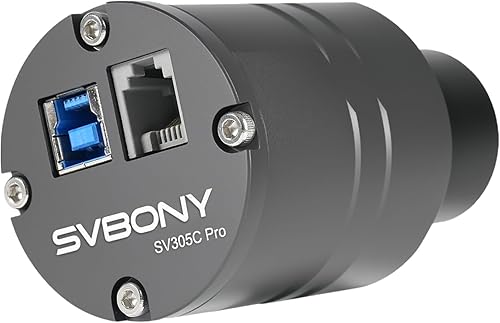
- 2 MP IMX662 sensor
- 1920 x 1080 at 107 FPS
- USB 3.0
- ST4 guiding interface
A telescope camera for people who already have a compatible telescope and want computer-based planetary capture. It needs a computer and doesn't support an iPad connection.
Pros
- High frame rate for planetary imaging
- USB 3.0 transfer
- ST4 guiding interface
- Works with MacBook
Cons
- Requires a separate telescope and computer
- Doesn't connect to iPad
- Manual focus
The SV305C Pro has a 2 MP IMX662 sensor, USB 3.0 and a stated 1920 x 1080 capture rate of 107 frames per second. It needs a compatible telescope and computer, so it is a component for a more involved setup rather than a self-contained smart telescope.
UNISTELLAR Odyssey PRO Smart Telescope: Best for electronic eyepiece viewing

- 85 mm optics
- 320 mm focal length
- Nikon electronic eyepiece
- Automatic target tracking
A smart telescope for observers who want a Nikon electronic eyepiece as well as app viewing. Its 85 mm optics and automatic target finding suit sessions that include planets and deep-sky objects.
Pros
- Nikon electronic eyepiece
- Smart Star Finder locates catalog objects
- Stellar Autofocus
- Automatic tracking
Cons
- Telescope weighs 8.8 lb and tripod 5.5 lb
- Requires the UNISTELLAR app
- App requires Android 10+ or iOS 18+
The Odyssey PRO has 85 mm optics, a 320 mm focal length, autofocus and a Nikon electronic eyepiece. It weighs 8.8 lb, with a 5.5 lb tripod, and runs through the UNISTELLAR app on compatible Android or iOS devices.
Compare the Seestar S30 Pro vs DWARF Mini if compactness is your priority. The Seestar S30 vs DWARF 3 comparison helps if you're weighing different smart telescope approaches.
For the upgrade decision, see Seestar S30 Pro vs S30 and compare its imaging features with the earlier S30. If you want to consider another compact model, our DWARF Mini smart telescope review covers that alternative.
The Seestar S50 vs DWARF 3 comparison is useful if you're also considering larger smart telescope options. You can also compare the Seestar S30 Pro vs S50 or the Seestar S30 vs DWARF Mini before choosing a travel setup.
Is the Seestar S30 Pro worth considering?
The Seestar S30 Pro is worth considering if you want automated deep-sky imaging in a compact, app-controlled telescope. Its automatic targeting, tracking, built-in filters and one-tap imaging modes fit a guided backyard workflow.
Pick the S30 Pro for portable smart imaging, the SV305C Pro for computer-based planetary capture with a separate telescope, or the Odyssey PRO if an electronic eyepiece matters. Start with your main targets and preferred viewing method, then compare the S30 Pro with the DWARF Mini if you want another compact smart telescope.
Frequently asked questions
Is the Seestar S30 Pro good for beginners?
The Seestar S30 Pro suits beginners who want app-controlled imaging with automatic GoTo targeting and tracking. It can find and follow celestial objects, while one-tap modes handle capture and processing.
You still need to learn the app and keep the telescope stationary during deep-sky imaging.
Can the Seestar S30 Pro photograph planets?
The Seestar S30 Pro is designed for deep-sky objects and isn't intended for planetary observation. If your main goal is detailed images of planets, a telescope camera such as the SVBONY SV305C Pro is a different route, but it requires a separate telescope and computer.
Can the Seestar S30 Pro work in a city?
The S30 Pro has built-in light pollution filters, and ZWO describes it as suitable for urban skies. Filters can help with imaging in bright surroundings, but they don't remove every effect of city lights; your target, sky conditions and setup still matter.
How portable is the Seestar S30 Pro?
The S30 Pro weighs about 3.6 lb and is described as compact for travel, camping and outdoor use. Its imaging workflow also needs a stationary setup during deep-sky capture, so choose a stable location and surface rather than planning to move it while tracking.